


We’re committed to making raspberrypi.com work well for everyone. Recently, we’ve been endeavouring to make the site more accessible to people using screen readers, such as JAWS and NVDA on Windows or VoiceOver on macOS and iOS.
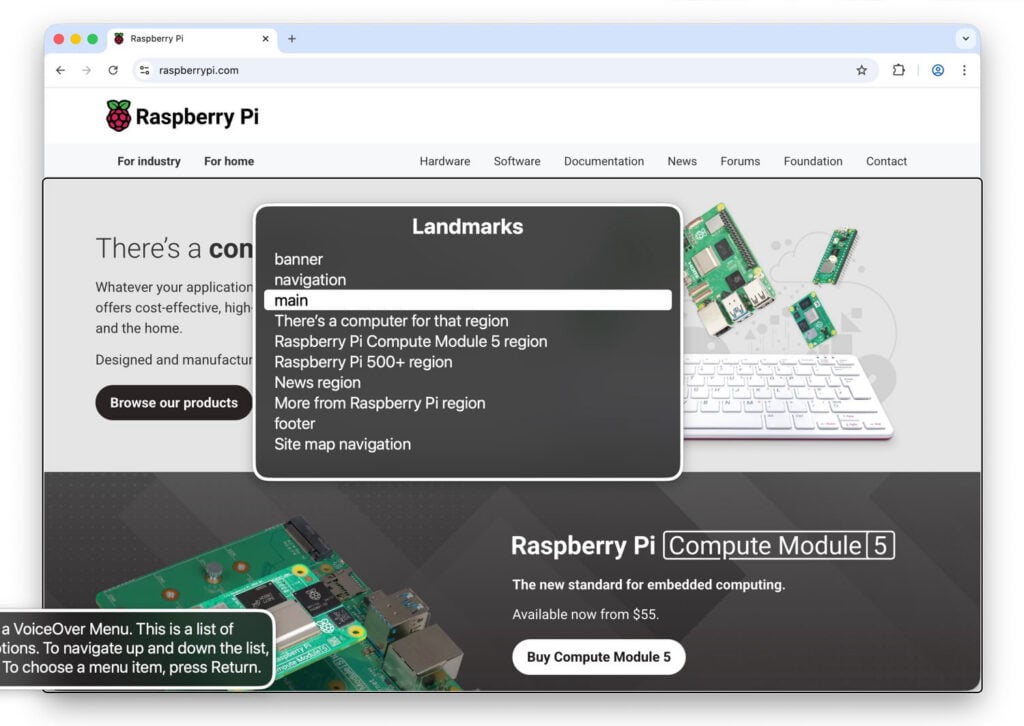
Previously, screen reader users had no way to quickly identify the main parts of pages or skip banners and navigation. To address this, we’ve now given each region proper labels and ‘landmarks’ (standard markup recognised by screen readers), allowing you to jump between different parts of the page.
We’ve also corrected our headings so that they follow a logical order and improved our links to reduce duplication; each link is now labelled clearly so that it makes sense on its own, no matter where it appears. Hints and error messages are now associated with their relevant form fields, making it easier to complete forms while using a screen reader.
Simplifying our CAPTCHA protections
The high volume of automated traffic we receive means we often need to distinguish between human users and bots. While we previously relied on hCaptcha to do this, we’ve now implemented Cloudflare Turnstile instead. Rather than presenting users with frustrating visual challenges, Turnstile verifies them behind the scenes using automatic checks.
While hCaptcha does offer an accessibility mode, it requires users to sign up separately and complete extra setup. Turnstile, however, works with screen readers without any extra steps. This change has been applied across raspberrypi.com, including on our forums, the Raspberry Pi ID page, and the Raspberry Pi Connect page. Our board member Chris Mairs found it to be a helpful improvement; he discusses his experience and encourages others to make the switch in a recent post on his blog, The Open Eyed Man.
We now test new and updated pages with a screen reader as part of our development process, checking landmarks, headings, links, and forms. We found Adam Liptrot’s guide to VoiceOver and Deque’s axe accessibility tools particularly helpful here.
Get in touch
If you use a screen reader and run into any issues on our site, or have ideas for further improvements, please get in touch. And if you’d like to improve your own website’s accessibility for screen readers and want to know more details, we’ll try to answer your questions in the comments below.
The post Accessibility improvements for screen readers on raspberrypi.com appeared first on Raspberry Pi.
Source: https://www.raspberrypi.com/news/screen ... rovements/